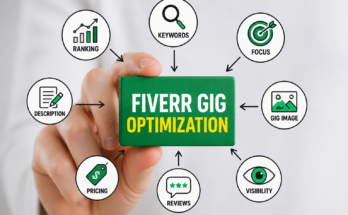


How to Optimize Your Fiverr Gig for More Clicks and Sales
I still remember the frustration of publishing my first Fiverr gig. I had spent hours writing the description, choosing a price, and clicking the Publish button. I genuinely believed orders would start coming in within a day or two.
Instead, nothing happened.
A week later, I checked my gig analytics. The impressions were low, the clicks were even lower, and there were no messages from buyers. At first, I thought Fiverr was simply too competitive. Later, I realized the problem wasn’t the platform—it was my gig.
I started paying close attention to successful sellers. I compared their gig titles, thumbnails, descriptions, and pricing with mine. Slowly, I updated every part of my gig instead of changing everything at once. Within a few weeks, I noticed a clear difference. More buyers were clicking on my gig, asking questions, and eventually placing orders.
That experience taught me an important lesson: creating a gig is easy, but knowing how to Optimize Your Fiverr Gig is what helps you attract real buyers.
If you’re a beginner or you’ve been waiting for your first order, this guide will show you practical steps that anyone can follow.
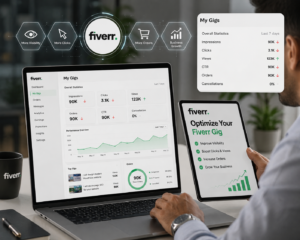
Why Gig Optimization Matters More Than You Think
Many new Fiverr sellers believe that simply creating a gig is enough. Unfortunately, that’s rarely the case Optimize Your Fiverr Gig.
Every day, thousands of new gigs are published across different categories. Buyers have countless options, so they usually choose gigs that look professional, trustworthy, and relevant to their needs.
Think of your Fiverr gig like a shop in a busy marketplace.
If your shop has a clean signboard, attractive display, and friendly service, people are more likely to stop and take a look. But if it looks unfinished or confusing, they’ll walk past without giving it a second thought.
That’s exactly how Fiverr works.
Your goal isn’t just to create a gig—it’s to make buyers click on it and feel confident enough to place an order.
What Does It Mean to Optimize Your Fiverr Gig?
Optimizing your gig means improving every element that influences a buyer’s decision.
This includes:
- Your gig title
- Thumbnail
- Description
- Search keywords
- Pricing
- Portfolio
- FAQs
- Delivery time
- Communication
- Optimize Your Fiverr Gig
When all of these work together, your gig becomes more appealing to both Fiverr’s search algorithm and potential buyers.
Step 1: Choose the Right Service Before Creating a Gig
One of the biggest mistakes I made was creating gigs for services that were far too broad.
For example, my first gig was simply called:
I Will Do Graphic Design
It sounded okay to me, but buyers had no idea what type of design I actually offered.
Instead, successful sellers create specific gigs.
Examples include:
- I Will Design Minimalist Business Logos
- I Will Create YouTube Thumbnail Designs
- I Will Design Professional Business Cards
- I Will Edit Instagram Reels
- I Will Write SEO Blog Articles
- Optimize Your Fiverr Gig
The more specific your service is, the easier it becomes for the right buyers to find you.
Research Buyer Demand
Before creating a gig, spend a few minutes searching on Fiverr itself.
Type your service into the search bar and notice the suggestions.
For example, if you type:
Fiverr may suggest:
- Minimalist Logo
- Modern Logo
- Luxury Logo
- Gaming Logo
- Optimize Your Fiverr Gig
These suggestions come from real buyer searches, making them valuable keyword ideas.
This simple habit can help you Optimize Your Fiverr Gig before you even publish it.
Step 2: Create a Professional Fiverr Profile
Many buyers click on your profile before placing an order.
If your profile looks incomplete, they may leave—even if your gig is good.
Here are a few things that instantly improve your credibility.
Use a Professional Profile Photo
Avoid:
- Dark selfies
- Optimize Your Fiverr Gig
- Blurry images
- Group photos
- Cartoon avatars
Instead, use:
- A clear headshot
- Good lighting
- Neutral background
- Friendly smile
A professional profile picture helps buyers feel they’re dealing with a real person.
Write a Helpful Bio
Your bio shouldn’t be about sounding impressive.
Instead, explain:
- What you do
- Who you help
- Your skills
- Why clients can trust you
- Optimize Your Fiverr Gig
Here’s an example:
I’m a content writer who specializes in SEO blog posts and website content. I focus on creating original, easy-to-read articles that help businesses attract more visitors and improve search rankings. I believe in clear communication, timely delivery, and providing work I’m proud to put my name on.
Notice that it sounds natural rather than overly promotional.
Complete Every Profile Section
Many beginners skip optional fields.
Don’t.
Complete:
- Skills
- Languages
- Education
- Certifications
- Work Experience
- Optimize Your Fiverr Gig
A complete profile gives buyers more confidence and often looks more professional.
Step 3: Write a Gig Title That Buyers Want to Click
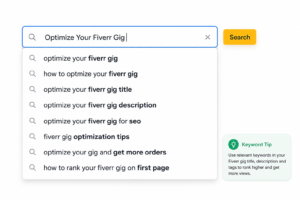
Your gig title is one of the first things buyers notice.
A vague title doesn’t tell buyers what they’ll receive.
Compare these examples.
Weak Title
I Will Write Articles
Better Title
I Will Write SEO-Optimized Blog Posts for Your Website
Even Better
I Will Write Engaging SEO Blog Posts That Help Improve Google Rankings
The second and third titles clearly explain the service and the benefit.
That’s exactly what buyers are looking for.
Keep Your Title Clear
A good title should answer three questions:
- What service are you offering?
- Who is it for?
- What benefit does it provide?
Avoid stuffing your title with unnecessary keywords.
Write naturally.
Remember, you’re writing for people first—not just search algorithms.
Step 4: Use Keywords Naturally
One question I hear all the time is:
“Should I repeat my keyword everywhere?”
The answer is no.
Instead, place your focus keyword Optimize Your Fiverr Gig naturally in relevant places such as:
- Gig title
- Description
- Search tags
- FAQs
- Portfolio captions
Natural writing always performs better than keyword stuffing.
Your goal is to help buyers understand your service, not overwhelm them with repeated phrases.
Step 5: Design a Gig Thumbnail That Gets Clicks

When I started on Fiverr, I didn’t pay much attention to my gig image. I created a simple thumbnail in a few minutes and uploaded it without thinking twice.
Later, while browsing Fiverr as a buyer, I noticed something interesting.
Before reading a title, my eyes always went to the thumbnail first.
That’s when I realized buyers do the same thing.
Your thumbnail acts like a storefront. If it looks professional, buyers are more likely to click. If it looks messy or outdated, they may scroll past without reading your title.
Tips for a High-Quality Fiverr Thumbnail
- Use a high-resolution image.
- Stick to 2–4 colors for a clean look.
- Keep text short and readable.
- Highlight your main service.
- Leave enough white space so the design doesn’t feel crowded.
A clean design almost always performs better than one filled with too many graphics or words.
Step 6: Write a Gig Description That Builds Trust

One of the biggest mistakes beginners make is writing a description that only talks about themselves.
Buyers don’t just want to know who you are—they want to know how you can solve their problem.
Instead of writing:
I have experience in graphic design.
Try something like:
Looking for a clean and professional logo for your business? I’ll create a unique design that matches your brand and is ready to use on websites, social media, and print materials.
Notice the difference?
The second version immediately focuses on the buyer’s needs.
Structure Your Description
A simple structure works well:
Start with the problem.
Show buyers that you understand what they’re looking for.
Explain your solution.
Describe exactly what you’ll deliver.
List what’s included.
For example:
- Original work
- High-quality files
- Commercial use (if applicable)
- Revisions
- Fast communication
End with a friendly call to action.
Example:
Feel free to message me before placing your order if you have any questions. I’ll be happy to help.
This approach feels natural and encourages buyers to contact you.
Step 7: Choose the Right Pricing Strategy
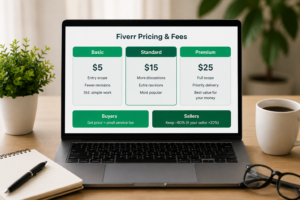
When I received my first order, my prices were lower than they are today.
That wasn’t because my work lacked quality—it was because I needed to build trust.
As a beginner, competitive pricing can help attract your first few clients.
Offer Three Packages
Creating Basic, Standard, and Premium packages gives buyers options.
For example:
Basic
- One simple deliverable
- Standard delivery
- Limited revisions
Standard
- Additional features
- Faster delivery
- More revisions
Premium
- Complete service
- Priority support
- Extra deliverables
Many buyers naturally choose the middle package because it offers the best balance between price and value.
Don’t Compete Only on Price
Avoid becoming the cheapest seller in your category.
Instead, compete through:
- Better communication
- Faster responses
- Clearer descriptions
- Attractive thumbnails
- High-quality work
Value attracts better buyers than extremely low prices.
Step 8: Add Portfolio Samples That Impress Buyers
Imagine hiring someone without seeing any examples of their work.
It feels risky.
Your buyers think the same way.
Even if you’re new, create sample projects that demonstrate your skills.
For example:
Content Writers
Upload:
- Blog articles
- Website pages
- Product descriptions
Graphic Designers
Show:
- Logos
- Flyers
- Business cards
- Social media posts
Video Editors
Include:
- Before-and-after edits
- Short reels
- Promotional videos
A strong portfolio often convinces buyers faster than a long description.
Step 9: Use Fiverr SEO to Reach More Buyers

One of the easiest ways to Optimize Your Fiverr Gig is by improving its SEO.
Fiverr’s search engine tries to match buyer searches with the most relevant gigs.
You can help by using relevant keywords naturally throughout your gig.
Where to Use Keywords
Include your main keyword in:
- Gig title
- First paragraph of the description
- Search tags
- FAQ section
- Portfolio captions (where appropriate)
Don’t force keywords into every sentence. If the text sounds unnatural, buyers will notice.
Choose Accurate Search Tags
Fiverr allows you to add tags that describe your service.
For an SEO writing gig, examples might include:
- SEO Content
- Blog Writing
- Article Writer
- Website Content
- Copywriting
Choose tags that genuinely match your service rather than unrelated popular terms.
Step 10: Create FAQs That Reduce Buyer Doubts
Many buyers have similar questions before placing an order.
Instead of answering the same questions repeatedly, use Fiverr’s FAQ section.
Helpful questions include:
- Do you offer revisions?
- What information do you need before starting?
- Can you handle custom orders?
- How quickly do you respond to messages?
- What file formats will I receive?
A good FAQ section saves time and makes your gig look more professional.
Step 11: Respond Quickly to Buyer Messages
Fast communication creates trust.
Even if a buyer doesn’t place an order immediately, a polite and timely response leaves a positive impression.
Simple habits make a difference:
- Reply professionally.
- Answer questions clearly.
- Avoid copying the same response to everyone.
- Ask follow-up questions when needed.
Good communication often turns inquiries into completed orders.
Step 12: Use Fiverr Analytics to Improve Your Gig
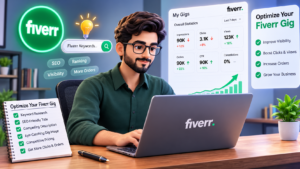
One feature many beginners completely ignore is Fiverr Analytics.
I used to check my dashboard only to see if I had received an order. Later, I realized the analytics section was telling me exactly what needed to be improved.
Instead of guessing why a gig wasn’t performing well, I started looking at the numbers.
Here are the most important metrics:
Impressions
This tells you how many times your gig appeared in Fiverr search results.
If impressions are low, it usually means your keywords, category, or tags need improvement.
Clicks
Clicks show how many people actually opened your gig.
If your impressions are high but clicks are low, your thumbnail or gig title probably isn’t attracting attention.
Try testing:
- A cleaner thumbnail
- A more specific title
- Better keywords
Small changes can make a noticeable difference.
Conversion Rate
Conversion rate measures how many visitors became buyers.
If buyers click your gig but don’t order, ask yourself:
- Is my description convincing?
- Are my prices reasonable?
- Does my portfolio show quality work?
- Is my profile complete?
Improving these areas can increase conversions over time.
Step 13: Keep Your Gig Updated
Many new sellers publish a gig and never touch it again.
That was one of my biggest mistakes.
Your skills improve, trends change, and buyers’ expectations evolve. Your gig should reflect those changes.
Every couple of weeks, review your gig and update things like:
- Portfolio samples
- Gig description
- Pricing
- FAQ section
- Keywords
- Delivery time
These regular updates help keep your gig fresh and relevant.
Step 14: Deliver a Great Buyer Experience
Getting clicks is important, but earning repeat customers is even better.
A satisfied buyer is more likely to:
- Leave a positive review
- Return for future projects
- Recommend your services to others
Here are a few habits that helped me:
- Respond politely to every message.
- Deliver work on time.
- Read the buyer’s requirements carefully.
- Ask questions if something isn’t clear.
- Offer revisions when appropriate.
Professional communication builds trust and helps you establish long-term relationships with clients.
Common Mistakes That Reduce Clicks and Sales
Even a well-designed gig can struggle if you make these common mistakes.
1. Using a Generic Gig Title
Titles like:
I Will Do Graphic Design
don’t tell buyers what they can expect.
Instead, be specific about your service.
2. Uploading Low-Quality Images
Blurry or cluttered thumbnails can reduce your click-through rate.
Use clean, professional visuals that match your service.
3. Ignoring SEO
If your gig doesn’t include relevant keywords, Fiverr may struggle to show it to the right audience.
Use your focus keyword naturally throughout the gig without overusing it.
4. Writing Long, Unorganized Descriptions
Large blocks of text are difficult to read.
Break your description into:
- Short paragraphs
- Bullet points
- Clear headings
This makes it easier for buyers to find the information they need.
5. Copying Other Sellers
It can be tempting to copy successful gigs, but buyers appreciate originality.
Write descriptions in your own voice and explain what makes your service unique.
6. Competing Only on Price
Offering the lowest price isn’t always the best strategy.
Many buyers prefer sellers who communicate well, have strong portfolios, and present themselves professionally.
Focus on value rather than being the cheapest option.
Quick Checklist to Optimize Your Fiverr Gig
Before publishing or updating your gig, go through this checklist:
- ✔ Choose a specific service.
- ✔ Research Fiverr search keywords.
- ✔ Write a clear, keyword-rich title.
- ✔ Design a professional thumbnail.
- ✔ Create a detailed, buyer-focused description.
- ✔ Add relevant search tags.
- ✔ Upload quality portfolio samples.
- ✔ Set competitive pricing.
- ✔ Complete the FAQ section.
- ✔ Respond quickly to buyer messages.
- ✔ Review your analytics regularly.
- ✔ Update your gig as your skills improve.
Following this checklist consistently can improve both your visibility and your chances of converting visitors into buyers.
Frequently Asked Questions
How often should I update my Fiverr gig?
A good practice is to review your gig every two to four weeks. Update your portfolio, refine your description, adjust pricing if needed, and make sure your keywords still match what buyers are searching for.
Does Fiverr SEO really help?
Yes. Fiverr uses keywords, tags, and gig relevance to determine which services appear in search results. Proper optimization improves your chances of reaching the right buyers.
Should I use the same keyword many times?
No. Use your focus keyword naturally in the title, description, tags, and FAQs. Overusing it can make your content sound unnatural and less appealing to buyers.
How many portfolio samples should I upload?
Aim for at least three to five high-quality samples that clearly demonstrate your skills. Keep your portfolio updated as you complete new projects.
Can a beginner compete with experienced Fiverr sellers?
Absolutely. Buyers don’t always choose the seller with the most reviews. A professional profile, optimized gig, clear communication, and quality work can help beginners win orders too.
Final Thoughts
Learning how to Optimize Your Fiverr Gig isn’t about finding a secret trick or shortcut. It’s about making small improvements that, together, create a better experience for both Fiverr’s search algorithm and potential buyers.
When I stopped chasing quick results and focused on improving my gig one section at a time, I noticed steady progress. Better thumbnails brought more clicks. Clearer descriptions increased buyer confidence. Strong portfolio samples led to more inquiries, and positive reviews gradually helped my gigs rank higher.
If you’re just starting, don’t worry about having hundreds of reviews. Focus on creating a gig that looks professional, answers buyers’ questions, and showcases the quality of your work. Keep learning, keep testing, and don’t be afraid to make changes based on what your analytics tell you.
Success on Fiverr rarely happens overnight, but consistent optimization and excellent service can turn a quiet gig into one that attracts regular clicks, messages, and sales