
How to Fix Fiverr Login Issues in 2026
Introduction
If you’re searching for how to fix Fiverr login issues in 2026, you’re not alone. Every day, thousands of freelancers and buyers experience login problems that prevent them from accessing their Fiverr accounts. Whether you’re seeing an incorrect password error, not receiving a verification code, facing two-factor authentication (2FA) issues, or dealing with a temporarily restricted account, these problems can be frustrating—especially when you have active orders or important client messages waiting.
The good news is that most Fiverr login issues can be resolved with a few simple troubleshooting steps. Understanding the root cause is the first step toward getting back into your account quickly and securely.
In this comprehensive guide, you’ll learn how to fix Fiverr login issues in 2026 using proven solutions. We’ll cover the most common login errors, explain why they happen, and walk you through practical fixes that work for both desktop and mobile users. Whether you’re a beginner or an experienced Fiverr seller, this guide will help you regain access to your account with confidence.
Table of Contents
- Why Fiverr Login Issues Happen
- Common Fiverr Login Problems
- Check Your Email and Password
- Reset Your Fiverr Password
- Browser-Related Login Issues
- Mobile App Login Problems
- Two-Factor Authentication (2FA) Issues
- VPN and Network Problems
- Account Disabled or Restricted
- Contacting Fiverr Support
- Frequently Asked Questions
- Final Thoughts
Why Do Fiverr Login Issues Happen?
Before trying different solutions, it’s important to understand why login problems occur. Knowing the cause makes it much easier to fix the issue.
If you’re trying to learn how to fix Fiverr login issues in 2026, remember that login errors don’t always mean your account has been hacked or suspended. In many cases, the problem is temporary and can be solved within a few minutes.
Some of the most common reasons include:
- Incorrect email address or password
- Forgotten password
- Browser cache or cookies
- Two-factor authentication problems
- Internet connection issues
- VPN or proxy usage
- Fiverr server maintenance
- Outdated Fiverr mobile app
- Suspicious login activity
- Temporary account restrictions
Fortunately, each of these issues has a solution, which we’ll cover step by step.
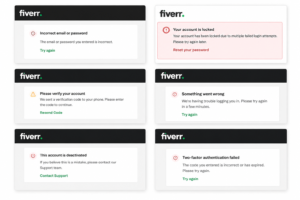
Common Fiverr Login Problems
Understanding the specific problem you’re facing is the first step toward fixing it.
Here are the most common Fiverr login issues users experience.
Incorrect Email or Password
This is one of the most frequent login problems.
Sometimes users accidentally:
- Enter the wrong email address
- Type an incorrect password
- Leave Caps Lock enabled
- Save an outdated password in their browser
Even a small typing mistake can prevent you from logging in.
How to Fix It
- Double-check your email address.
- Make sure Caps Lock is turned off.
- Try typing your password manually instead of using autofill.
- Verify that you’re using the correct Fiverr account.
Many users searching for how to fix Fiverr login issues in 2026 discover that the problem is simply an incorrect login credential.
Forgot Your Fiverr Password?
Forgetting your password is completely normal, especially if you haven’t logged in for a while.
Fortunately, Fiverr provides a quick password recovery option.
How to Reset Your Password
- Go to the Fiverr login page.
- Click Forgot Password?
- Enter your registered email address.
- Check your inbox for the reset email.
- Click the password reset link.
- Create a strong new password.
- Log in using your new credentials.
Choose a password that includes:
- Uppercase letters
- Lowercase letters
- Numbers
- Special characters
A stronger password not only improves security but also reduces the chances of unauthorized access.
Check Your Internet Connection
Many login problems have nothing to do with Fiverr itself.
A weak or unstable internet connection can interrupt the login process and prevent authentication.
Signs of a Network Issue
- Login page keeps loading
- Verification code doesn’t appear
- Login request times out
- Fiverr website won’t load completely
Quick Solutions
- Restart your Wi-Fi router.
- Switch to mobile data temporarily.
- Try another internet connection.
- Restart your device.
- Refresh the Fiverr page.
If the login works on another network, the problem is likely related to your internet connection rather than your Fiverr account.
Clear Browser Cache and Cookies
Old browser data can interfere with Fiverr’s login system.
Your browser stores cached files and cookies to improve loading speed, but outdated data may cause login errors.
If you’re researching how to fix Fiverr login issues in 2026, clearing your browser cache is one of the easiest and most effective solutions.
How to Clear Cache
For Google Chrome:
- Open Chrome.
- Click the three-dot menu.
- Select Settings.
- Open Privacy and Security.
- Click Clear Browsing Data.
- Select:
- Cookies
- Cached Images and Files
- Click Clear Data.
- Restart your browser.
After clearing your cache, try logging into Fiverr again.
Many users find that this simple step immediately resolves loading and authentication problems.
Try a Different Browser
Sometimes the issue isn’t your Fiverr account—it’s your browser.
If you’re unable to log in:
- Try Google Chrome.
- Try Mozilla Firefox.
- Try Microsoft Edge.
- Try Safari (Mac users).
Also, disable unnecessary browser extensions, especially:
- Ad blockers
- VPN extensions
- Security plugins
- Cookie blockers
These extensions can sometimes interfere with Fiverr’s authentication system.
Best Practices for Secure Login
To reduce future login issues:
- Use a strong password.
- Enable Two-Factor Authentication (2FA).
- Avoid public Wi-Fi when accessing Fiverr.
- Don’t share your login credentials.
- Keep your browser updated.
- Log out from shared computers.
Following these security practices helps protect your account and minimizes future login problems.
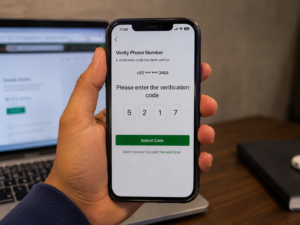
Fix Two-Factor Authentication (2FA) Issues
Two-Factor Authentication (2FA) adds an extra layer of security to your Fiverr account. While it’s highly recommended, it can sometimes become the reason you can’t log in.
If you’re searching for how to fix Fiverr login issues in 2026, problems with 2FA are among the most common causes.
Common 2FA Problems
- Verification code not received
- Expired authentication code
- Lost authentication device
- Incorrect verification code
- Authenticator app not syncing
How to Fix 2FA Problems
1. Wait a Few Minutes
Sometimes SMS verification codes are delayed due to network congestion.
Wait for 2–5 minutes before requesting another code.
2. Check Your Mobile Signal
A poor network connection can prevent you from receiving SMS verification codes.
Try:
- Switching between Wi-Fi and mobile data
- Restarting your phone
- Turning Airplane Mode on and off
3. Sync Your Authenticator App
If you use Google Authenticator or another authentication app, make sure your phone’s date and time are set to Automatic.
Incorrect device time often causes verification codes to fail.
4. Use Backup Codes
If you previously saved Fiverr backup codes, you can use one to access your account.
Many users forget these codes until they actually need them.
Fix Fiverr Mobile App Login Issues
Some users can log in through a browser but not through the Fiverr mobile app.
If you’re learning how to fix Fiverr login issues in 2026, don’t ignore app-related problems.
Common App Issues
- App keeps loading
- Login button doesn’t work
- Blank screen
- Session expired repeatedly
- App crashes after login
Solutions
- Update the Fiverr app.
- Restart your phone.
- Clear the app cache.
- Reinstall the application.
- Log in through your mobile browser to check whether the issue is app-specific.
Keeping the Fiverr app updated ensures compatibility with the latest security features and bug fixes.
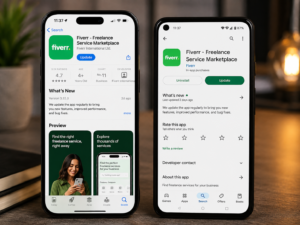
Clear Fiverr App Cache
Corrupted cache files can prevent the app from functioning correctly.
Android Users
- Open Settings.
- Tap Apps.
- Select Fiverr.
- Open Storage.
- Tap Clear Cache.
Avoid selecting Clear Data unless necessary, as you’ll need to log in again.
iPhone Users
iOS doesn’t provide a direct cache-clearing option.
Instead:
- Delete the Fiverr app.
- Restart your iPhone.
- Install the latest version from the App Store.
This removes temporary files that may be causing login problems.
Disable VPN or Proxy Services
VPNs are useful for privacy, but they can occasionally interfere with Fiverr’s security system.
If Fiverr detects unusual login locations, it may temporarily block authentication to protect your account.
If you’re wondering how to fix Fiverr login issues in 2026, temporarily disabling your VPN is worth trying.
What to Do
- Disconnect your VPN.
- Disable any proxy settings.
- Refresh the Fiverr login page.
- Try logging in again.
If the login succeeds after disabling the VPN, you’ve identified the source of the problem.
Check If Fiverr Is Down
Sometimes the issue isn’t on your side.
Fiverr may be:
- Performing scheduled maintenance
- Experiencing temporary server issues
- Rolling out updates
Before changing passwords or troubleshooting your device, check whether Fiverr is experiencing an outage.
If the servers are temporarily unavailable, the best solution is simply to wait until services are restored.
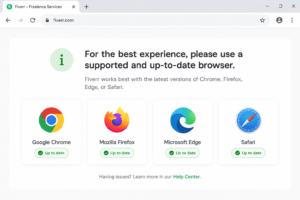
Update Your Browser
An outdated browser can create compatibility issues with Fiverr’s login system.
Supported browsers include:
- Google Chrome
- Mozilla Firefox
- Microsoft Edge
- Safari
Always update your browser to the latest version for improved security and better performance.
Older browser versions may not support Fiverr’s newest security features.
Check for Suspicious Login Activity
Fiverr actively monitors accounts for unusual activity to protect users.
Your account may be temporarily locked if Fiverr detects:
- Multiple failed login attempts
- Login from a different country
- Login from multiple devices simultaneously
- Automated or suspicious activity
This security measure helps prevent unauthorized access.
What You Should Do
- Wait a short period before trying again.
- Verify your identity if Fiverr requests additional information.
- Reset your password if necessary.
- Check your email for any security notifications from Fiverr.
Use the Correct Login Method
Many users accidentally choose the wrong login option.
For example, if you originally signed up using:
- Apple
You should continue using the same login method unless you’ve linked an email and password separately.
Trying to log in with a different method can make it seem like your account doesn’t exist.
Keep Your Fiverr Account Secure
Preventing login issues is easier than fixing them.
Follow these best practices:
- Use a unique password.
- Enable Two-Factor Authentication (2FA).
- Keep your recovery email updated.
- Avoid logging in on public computers.
- Regularly review your account security settings.
- Never share verification codes with anyone.
Following these habits will significantly reduce the chances of future login problems.
Learning how to fix Fiverr login issues in 2026 also means understanding how to prevent them before they happen.
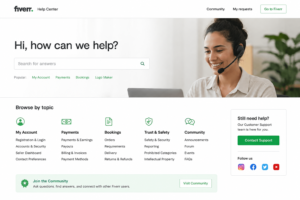
How to Contact Fiverr Support for Login Issues
If you’ve tried every troubleshooting method and still can’t access your account, it’s time to contact Fiverr Customer Support.
Many users searching for how to fix Fiverr login issues in 2026 eventually discover that their problem requires direct assistance from Fiverr’s support team.
The support team can help with:
- Login problems
- Password reset issues
- Two-Factor Authentication (2FA) errors
- Suspended or restricted accounts
- Security verification
- Unauthorized login attempts
- Account recovery
Before Contacting Fiverr Support
To help Fiverr resolve your issue faster, gather the following information:
- Your registered email address
- Fiverr username
- Screenshots of any error messages
- Date and time the problem started
- Device and browser information
- Steps you’ve already tried
Providing complete information can speed up the support process and reduce unnecessary back-and-forth communication.
What If Your Fiverr Account Is Disabled?
One of the most stressful situations is discovering that your Fiverr account has been temporarily restricted or disabled.
However, don’t panic.
In many cases, Fiverr disables accounts for security reasons or policy reviews.
Common reasons include:
- Suspicious login activity
- Multiple failed login attempts
- Violation of Fiverr’s Terms of Service
- Identity verification issues
- Payment-related concerns
How to Recover a Disabled Fiverr Account
If your account has been disabled:
- Check your registered email for notifications from Fiverr.
- Carefully read the reason provided.
- Follow any verification instructions.
- Contact Fiverr Support if you believe the restriction was made by mistake.
- Avoid creating multiple accounts, as this may violate Fiverr’s policies.
Patience is important during the review process. Fiverr’s support team may need time to verify your account details.
Tips to Prevent Fiverr Login Issues in the Future
The best way to avoid login problems is to practice good account security.
Here are some simple but effective tips:
Use a Strong Password
Create a password that includes:
- Uppercase letters
- Lowercase letters
- Numbers
- Special characters
Avoid using personal information like your name or birthdate.
Enable Two-Factor Authentication (2FA)
Although 2FA can occasionally create login challenges, it significantly improves account security.
It protects your Fiverr account even if someone discovers your password.
Keep Your Recovery Information Updated
Make sure your recovery email address and phone number are always current.
This makes account recovery much easier if you ever lose access.
Avoid Public Devices
Logging into Fiverr from public computers or shared devices increases security risks.
If you must use a public computer:
- Log out when finished.
- Clear the browser history.
- Never save your password.
Regularly Update Your Devices
Install the latest updates for:
- Your browser
- Operating system
- Fiverr mobile app
Updated software reduces compatibility issues and improves security.
Following these best practices will minimize future login problems and help protect your account.
Frequently Asked Questions (FAQs)
Why can’t I log in to my Fiverr account?
The most common reasons include entering the wrong email or password, browser cache issues, internet connection problems, Two-Factor Authentication (2FA) errors, or temporary account restrictions.
How do I reset my Fiverr password?
Click Forgot Password on the Fiverr login page, enter your registered email address, and follow the password reset instructions sent to your inbox.
Does clearing browser cache fix Fiverr login problems?
Yes. In many cases, clearing your browser’s cache and cookies removes outdated files that interfere with the login process.
Why am I not receiving the Fiverr verification code?
This may happen due to poor mobile network coverage, delayed SMS delivery, an incorrect phone number, or temporary server issues.
Can I use Fiverr with a VPN?
Although Fiverr doesn’t completely prohibit VPN usage, frequent changes in login location may trigger additional security checks or temporary login restrictions.
What should I do if Fiverr says my account is disabled?
Read the email sent by Fiverr, follow the instructions provided, and contact Fiverr Support if you believe the action was taken in error.
Final Thoughts
Experiencing login problems can be frustrating, especially when you have active projects or important client conversations waiting. Fortunately, most login issues can be resolved by checking your credentials, resetting your password, clearing your browser cache, updating the Fiverr app, or fixing Two-Factor Authentication (2FA) problems.
If you’ve been searching for how to fix Fiverr login issues in 2026, the solutions in this guide should help you identify the cause and regain access to your account as quickly as possible.
Remember that keeping your account secure is just as important as fixing login issues. Use a strong password, enable Two-Factor Authentication, avoid suspicious networks, and keep your recovery information updated. These simple habits can prevent many common login problems before they happen.
By following the steps in this guide, you’ll not only know how to fix Fiverr login issues in 2026, but you’ll also be better prepared to protect your Fiverr account and enjoy a smoother freelancing experience.
Quick Checklist
✅ Verify your email and password
✅ Reset your password if needed
✅ Clear your browser cache and cookies
✅ Update the Fiverr mobile app
✅ Disable VPN or proxy temporarily
✅ Check your internet connection
✅ Verify your 2FA settings
✅ Try a different browser or device
✅ Contact Fiverr Support if the problem persists